How to Find Your Geojit User ID?
Forgot your Geojit user ID? Don't worry. You can easily retrieve it online using your registered mobile number and PAN card details. Once verified through OTP authentication, your Trade Code/User ID and Customer Identification Number (CID) will be sent to your registered email address.
Steps to Find Your User ID:
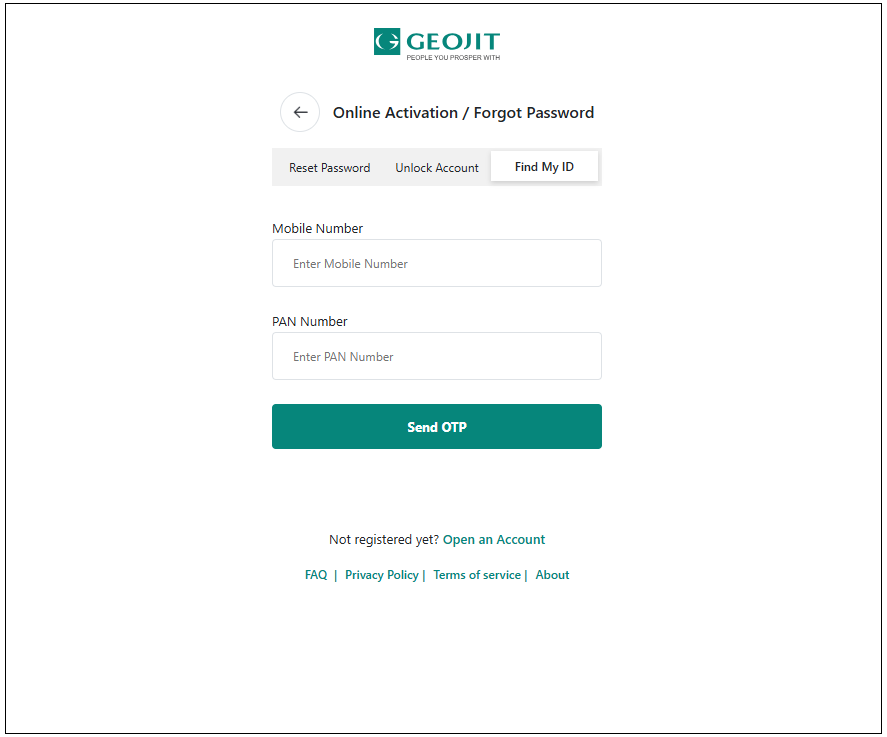
- Visit login.geojit.com.
- Click on Forgot Password.
- Select Find My ID.
- Enter your registered mobile number and PAN number.
- Click on Send OTP.
- Enter the OTP received on your registered mobile number.
- After successful verification, your Trade Code/User ID and Customer Identification Number (CID) will be sent to your registered email ID.
Things to Keep Ready
Before starting the process, ensure you have:
- Your registered mobile number
- Your PAN number
- Access to your registered email ID
- Access to receive OTPs on your registered mobile number
Still need help? Create Ticket


